Use case
AI promo videos for apps and SaaS
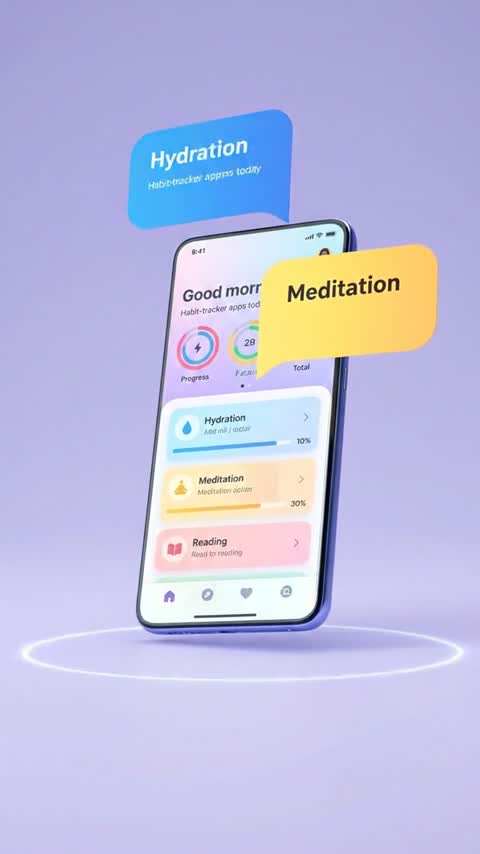
The App Screen Demo template turns one real screenshot into a floating-phone shot for 5 credits, with no prompt. Launch B-roll starts at 3 credits, and a 450-character voiceover is 2. What AI cannot do is draw your interface: generated screens come out with invented buttons and garbled text, so every shot of the product should start from a real screenshot.
From 3 credits a clip. Credits never expire, and failed generations are refunded automatically.
The workflow, step by step
Every step names the Viralance tool it runs on.
- 1
Export real screenshots at full resolution
Take each screen you want to show from the actual product, with real data that looks like a customer's and nothing private. Large type and one clear action per screen survive animation far better than a dense dashboard.
- 2
Animate each screenshot on a device
Run App Screen Demo (5 credits) on a phone screenshot. For a laptop or a custom mockup, place the screenshot in the frame yourself, then use image-to-video with a small camera move: Kling 3.0 Standard is 8 credits for 5 seconds at 1080p.
- 3
Generate the world around the product
Launch videos need context shots: a person checking a phone on a train, a desk at night with a coffee, a team around a whiteboard. These have no UI in them, so text-to-video handles them well. VEO 3.1 Lite does 4 seconds with sound for 3 credits.
- 4
Explain it with a voice or a presenter
Write the script around one problem and one result. The AI voiceover reads 450 characters for 2 credits; AI Actors turns a script into a lip-synced presenter at about 2 credits per second, so a 30-second explainer is about 60.
- 5
Or start from your landing page
Link to Ad reads a product URL and drafts a video ad plan for free; you see and approve the cost before anything is generated. Check every claim in the plan against what the product really does.
- 6
Caption and cut
Subtitles burns in captions for 3 credits. Assemble screens, B-roll and voice in your editor; for app store previews, follow the store's own rules on what footage may show.
Models that suit this job
Credits per clip from the live price list. Dollar figures use the $9 Mini pack and the $299 Business pack.
| Model | Setting | Credits | Mini / Business | Why this one | Try |
|---|---|---|---|---|---|
| VEO 3.1 Lite | Photo · 6s · 1080p | 6 | $1.80 / $1.09 | Sharp 1080p motion on a screenshot mockup for 6 credits, with optional ambient sound. | Try it |
| Kling 3.0 Standard | Photo · 5s | 8 | $2.40 / $1.45 | Steady, predictable camera moves that keep a screen flat and legible. | Try it |
| VEO 3.1 Lite | Text · 4s · 720p | 3 | $0.90 / $0.54 | Cheap lifestyle B-roll with sound: the moments where people would use the app. | Try it |
| VEO 3.1 Fast | Text · 8s · 1080p | 12 | $3.60 / $2.17 | A founder-style line to camera with an AI-generated person, when you can't film one. | Try it |
VEO 3.1 Lite
6 creditsPhoto · 6s · 1080p · $1.80 / $1.09
Sharp 1080p motion on a screenshot mockup for 6 credits, with optional ambient sound.
Try VEO 3.1 LiteKling 3.0 Standard
8 creditsPhoto · 5s · $2.40 / $1.45
Steady, predictable camera moves that keep a screen flat and legible.
Try Kling 3.0 StandardVEO 3.1 Lite
3 creditsText · 4s · 720p · $0.90 / $0.54
Cheap lifestyle B-roll with sound: the moments where people would use the app.
Try VEO 3.1 LiteVEO 3.1 Fast
12 creditsText · 8s · 1080p · $3.60 / $2.17
A founder-style line to camera with an AI-generated person, when you can't film one.
Try VEO 3.1 Fast
A launch set of three animated screens with the template, two B-roll shots, one voiceover and one subtitle pass comes to 26 credits, about $7.80 on the entry pack. Add about 60 credits for a 30-second AI presenter.
One-click templates for this
Upload one photo, no prompt needed. The price is the full cost with default settings.


Why you should never ask a model to draw your UI
A prompt like "a phone showing our budgeting app" produces a screen that looks plausible for a second and wrong on pause: made-up icons, letters that are not letters, numbers that change between frames. For software, that is worse than no video, because the promo now shows a product that does not exist.
Starting from a screenshot fixes most of it, but motion still costs legibility. Keep the move slow and short (a gentle push-in or a few degrees of tilt), keep the screen facing the camera, and avoid anything that scrolls the content: the model will invent what scrolls into view.
- Check every frame of a screen shot for changed text or numbers before export.
- Prefer 5–6 second shots; drift grows with length.
- Put feature names and prices in captions or titles, not in generated imagery.
Shots that sell software without showing software
Most strong SaaS promos spend more time on the customer than on the interface: the late-night spreadsheet, the missed message, the relieved close of a laptop. Those scenes are where AI video is genuinely useful, because there is nothing in them that must be exact.
Prompts to start from
Copy one, or open it in the studio with the model already selected.
The phone screen from the image stays exactly as shown while the phone floats slowly toward the camera against a soft gradient background, gentle shadow, no change to the screen content
Pin the screen in words as well as in the photo.
Use this promptA tired freelancer at a kitchen table at night closes a laptop, leans back and smiles, warm lamp light, quiet room tone, slow push-in
The "after" moment of a productivity app, no UI needed.
Use this promptSlow 10-degree orbit around the laptop from the image on a clean desk, the screen stays sharp and unchanged, morning light from a window
Small orbit; larger ones distort the screen.
Use this promptQuestions about this
Can AI generate a demo of my app?
Not reliably. Video models invent interfaces: buttons, text and numbers that your product does not have. Animate real screenshots instead, with small camera moves, and use AI for the scenes around the product.
What does the App Screen Demo template need?
One phone screenshot or a phone mockup image. It puts the screen on a floating phone and animates it with VEO 3.1 Lite for 5 credits, with no prompt to write.
Can I make an explainer with a presenter?
Yes, with AI Actors: write a script, pick a presenter and voice, and it returns a lip-synced video at about 2 credits per second on the Standard tier. Label the presenter as AI if viewers could take them for your team.
Can I use these clips in an App Store or Google Play preview?
Check the store guidelines first. App Store previews are expected to show the app itself, so generated lifestyle footage may not be allowed there even though it works in social ads and on your website.
Does Link to Ad work with a SaaS landing page?
It takes any full https product link and drafts an ad plan for free. You approve the cost before generation. Review the plan, because it can only use what the page says.