How to turn a video into anime, cartoon or 3D animation with AI (2026 guide)
Opens Restyle. Upload a clip, describe the look and preview the first 10 seconds for 3 credits before running the whole clip (10 credits per started minute).
Restyle a videoThis guide covers the four looks people ask for most, with the exact prompts we used on one test clip, what each look costs, how the main tools compare on price and clip length, and how to fix the usual problems.
Restyle or generate: which one do you need?
There are two different jobs that both get called "AI anime video".
- Restyle (video to video). You have footage: a dance, a vlog, a pet clip, a gameplay recording. You want the same movement, timing and sound in a new look. This guide is about this job.
- Generate (text or image to video). You have no footage. A model invents the motion from a prompt or a still picture. Use text to video or image to video for that.
If the movement in your clip matters (a choreography, a trick shot, someone talking), restyle it. A generated clip cannot copy it exactly.
Four looks from one clip, with the prompts
We ran one 10-second clip of a fox through Restyle four times. Each run kept the original motion and cost 3 credits as a 10-second preview.
| Look | Prompt we used | Best for |
|---|---|---|
| Anime | Japanese anime film style, cel-shaded | People, city scenes, dance clips |
| Cartoon | 2D cartoon, bold outlines, flat colors | Pets, kids' content, explainers |
| 3D animated | 3D animated movie look | Family clips, characters, product mascots |
| Clay | claymation stop-motion | Food, toys, short loops |
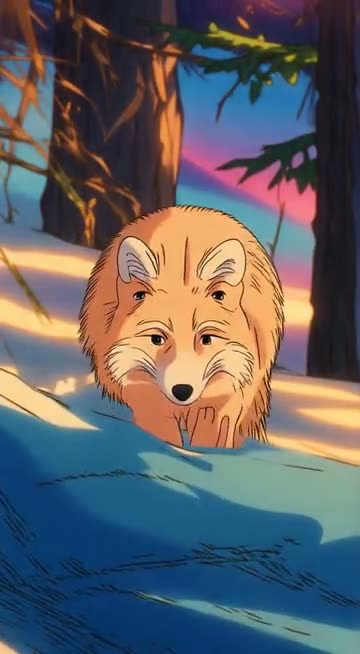
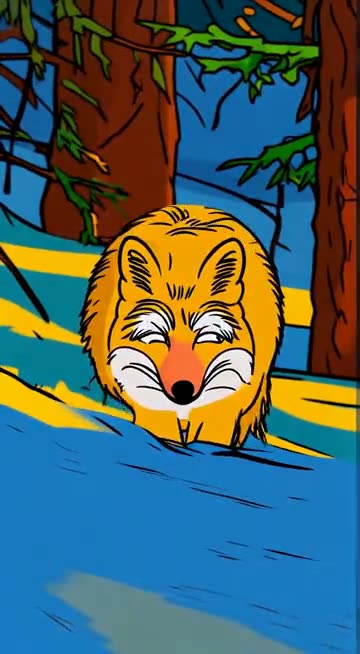
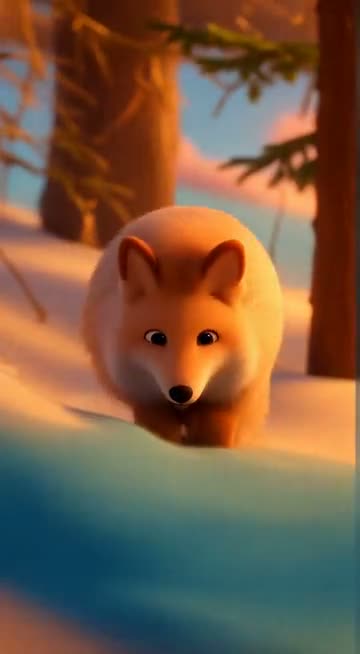
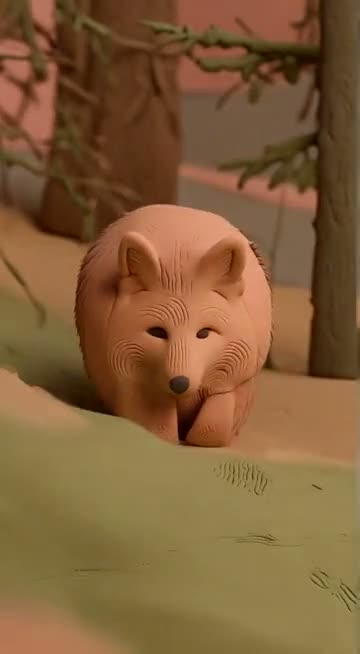
You can watch all four clips on the Restyle page.
How to turn a video into anime
- Open Restyle and upload the clip (up to 10 minutes, up to 500 MB).
- Write the look. Name the kind of anime, because "anime" alone is vague:
- TV anime: "90s cel anime, flat colours, bold outlines, painted backgrounds"
- Film look: "hand-painted anime film, soft watercolour sky, warm light, gentle film grain"
- Choose First 10 s (3 credits) to check the look on your own footage.
- If it looks right, run the whole clip. If faces drift too far from the original, lower the style strength and try the preview again.
More detail is on the video to anime page, and a price comparison of anime tools is in video to anime AI tools compared.
How to turn a video into a cartoon
Describe three things in one or two lines: the cartoon style, how the main character should look, and the mood. For example:
- "Flat 2D cartoon, bold black outlines, bright saturated colours, simple shapes, cheerful mood"
- "Comic-book ink and halftone dots, strong shadows, limited colour palette"
Short and concrete prompts work better than long ones. The prompt field takes up to 900 characters, but most good results come from under 200. See turn a video into a cartoon for more examples.
How to make a video look like a 3D animated movie
Describe the look instead of naming a studio. Words that work:
- Shapes and surfaces: smooth rounded shapes, soft glossy surfaces
- Character: big expressive eyes, simplified hair, same outfit as the original
- Mood and light: warm, playful, golden-hour light
A full prompt: "3D animated family film, smooth rounded shapes, soft glossy surfaces, big expressive eyes, warm golden-hour light." Describing the look keeps the result an original character instead of a copy of someone else's. More on the 3D animated movie look page.
Clay, painted and other looks
Restyle follows any written look, and every look costs the same. Others that people use:
- Clay animation: "claymation stop-motion, visible fingerprints in the clay, soft studio light"
- Watercolour: "hand-painted watercolour, soft edges, paper texture"
- Comic: "comic-book ink, halftone dots, bold outlines"
Use the 3-credit preview to compare two or three looks on the same clip before you commit. See change a video's style and keep the motion.
What it costs
On Viralance the price depends only on the length of the source video, not on the look.
| Source clip | Credits | With the $9 pack ($0.30 a credit) |
|---|---|---|
| First 10 seconds (preview) | 3 | $0.90 |
| Up to 1 minute | 10 | $3.00 |
| 3 minutes | 30 | $9.00 |
| 10 minutes | 100 | $30.00 |
Each started minute is billed, so a 61-second clip counts as two minutes. A job that fails is refunded automatically. New accounts get 6 credits after email verification, which covers two 10-second previews.
How the main tools compare
Prices were checked on each vendor's pricing page on November 7, 2026 and can change.
| Tool | Entry price | Input length | Billing |
|---|---|---|---|
| Viralance Restyle | $9 once (30 credits) | Up to 10 minutes, 500 MB | 10 credits per started minute |
| DomoAI | $13 a month ($9 billed yearly) | 10 s on Basic and Standard, 30 s on Pro | 600 credits a month on Basic |
| GoEnhance | $9.99 a month ($8 billed yearly) | 20 s on Standard, 60 s on Pro | 600 tokens a month on Basic |
| Runway | $15 a month ($12 billed yearly) | Not stated | Aleph 2.0: 28 credits per second |
Sources: DomoAI pricing, GoEnhance pricing, Runway pricing.
The practical difference is clip length. Tools that cap input at 10 to 30 seconds suit short loops. For a full dance, a vlog section or a long-form video, per-minute billing with a long input limit is cheaper and avoids cutting the clip into pieces.
Fixing common problems
- The person no longer looks like themselves. Lower the style strength. It sets how far the redraw goes: lower keeps more of the original footage.
- The look is too faint. Raise the style strength, and make the prompt more specific ("bold black outlines, flat colours" instead of "cartoon").
- The style changes during the clip. Shorten the prompt to one clear look. Mixed instructions ("anime but also realistic") pull the model in two directions.
- Hands and small text look wrong. Fast hand movement and small on-screen text are the hardest parts for any restyle model. Wider shots hold up better than close-ups of hands.
- The upload is refused. Prompts that name a public figure are refused. Use footage of yourself or of people who agreed to it.
Frequently asked questions
Can AI turn a video into anime? Yes. A video-to-video restyle model redraws each frame in an anime look and keeps the original movement. On Viralance, upload the clip to Restyle, describe the anime look and run it; it costs 10 credits per started minute.
Does the restyled video keep the original sound? On Viralance, yes. Restyle redraws the picture and puts the original soundtrack back on the result, so speech and music stay in place.
How long can the video be? Up to 10 minutes and 500 MB per upload on Viralance. Several other tools limit input to between 10 and 60 seconds depending on the plan.
What resolution is the result? Up to 720p on Viralance. You can upscale a short result afterwards if you need more.
Is there a free way to try it? New Viralance accounts get 6 credits after email verification. A 10-second preview is 3 credits, so you can test two looks on your own footage before buying anything.
Can I turn a video of myself into a cartoon? Yes, for footage of yourself or of people who gave permission. Prompts that name a public figure are refused.
Can I use the result on TikTok, Reels or Shorts? Yes. Download the video and post it as usual. TikTok and other platforms ask you to label AI-generated or heavily AI-edited content, so turn on that label when you upload.
What if I have no footage at all? Then you need generation, not restyle. Use text to video to describe an animated scene, or image to video to animate a drawing or a photo.