Viralance
ExploreModelsTemplatesPricing
UGC adsText to videoImage to videoCreator programAPIBlogFAQiPhone app
Sign inStart freeGet started free
ExploreModelsTemplatesPricingUGC adsText to videoImage to videoCreator programAPIBlogFAQ
Sign inDownload on theApp Store
  1. Home
  2. Templates
  3. AI dance generator

Photo effect · full body

AI dance generator

One standing photo is enough. The person in it bounces, sways, spins and lands a pose, with an upbeat track underneath.
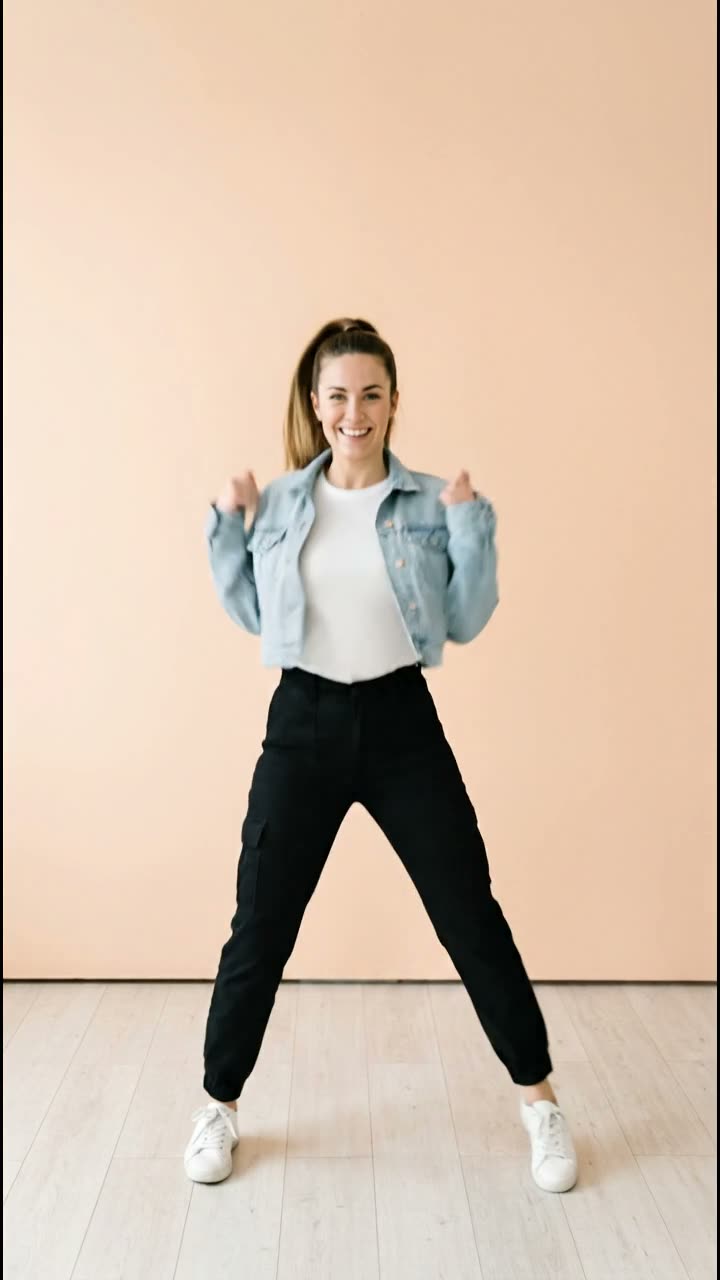
Made with VEO 3.1 Fast

Example made with VEO 3.1 Fast on AI-generated sample photos. The template runs on Kling 3.0 by default.

Price
8 credits
Model
Kling 3.0
Length
5s · 720p
Like the example
12 credits
Open the AI Dance template

Nothing is charged until you generate. Failed generations are refunded.

You do not need a reference dance video. Kling 3.0 makes up the choreography from your photo: bouncing steps, shoulder pops and a spin, with the whole body kept in frame and generated music under it.

Want a specific routine copied move for move? That is motion transfer, which lives in Edit Studio: you upload the dance you want copied. AI Dance is the quick version for when you simply want a photo to move to a beat.

Photos that dance well
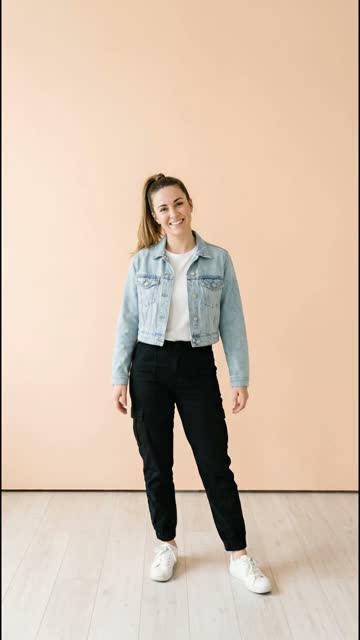
Sample input: a woman in a denim jacket standing in a bright studio
  • Head to toe in frame. Cropped feet in the photo mean cropped feet in the video.
  • Standing, arms loose, with some empty space around the body for the spin.
  • A plain wall or an uncluttered room keeps the background steady.
  • One person per photo.

Left: the sample photo the example started from.

Making your pet dance instead? Pet Dance Party

How it works

  1. 1

    Open AI Dance

    Sign in and open the AI Dance template from Templates.

  2. 2

    Upload a full-body photo

    Drop a photo where the person is visible from head to toe.

  3. 3

    Check the settings

    The default is Kling 3.0, 5 seconds at 720p with music. Switch to VEO 3.1 Fast to get the look of the example.

  4. 4

    Generate

    The clip costs 8 credits by default and appears in My Videos when it is done.

Questions

Do I need a dance video to copy?

No. AI Dance invents the moves from one photo. If you want to copy a specific routine, use motion transfer in Edit Studio instead.

Does the video have music?

Yes. Kling 3.0 generates an upbeat instrumental with the dance. You can swap the audio later in the Audio Suite.

How much does an AI dance video cost?

8 credits for a 5-second Kling 3.0 clip at 720p. The example was made with VEO 3.1 Fast for 12 credits. The template dialog shows the total before you generate, and failed generations are refunded.

Why are the feet cut off in my video?

The video keeps the framing of your photo. Use a photo with the full body in frame and a little space below the feet.

Can I make my pet dance?

AI Dance is tuned for people. For cats and dogs, Pet Dance Party gives your pet a confetti-filled dance floor.

More photo effects

  • AI hug generator10 credits
  • Bring old photos to life3 credits
  • AI muscle generator3 credits
  • AI aging video3 credits

Or browse all AI video templates.

Related pages

  • SuperheroExample
  • AI Motion ControlFeature
  • Video to AnimeFeature
  • 360 Hero Spin templateTemplate
  • AI hug generatorPhoto effect
  • Flat-Lay Spin templateTemplate

Make your AI Dance video

8 credits with the default settings. You see the exact total before you generate.

Open the AI Dance templateSee pricing
  • No subscription
  • Credits never expire
  • Failed generations refunded
Open the AI Dance template· 8 credits

Made to stop
the scroll.

Popular

  • One-click video templates
  • AI UGC ad generator
  • Seedance vs VEO vs Kling
  • Pricing (no subscription)
  • Video generation API & MCP
  • Integrations (Zapier, Canva, MCP)
  • Higgsfield alternative
  • Arcads alternative
  • Fair Credit Promise
  • What's new (changelog)
  • Affiliate program
  • Creator program

AI video models

All modelsKlingSeedancePixVerseHailuoVEOWanKling 3.0Kling 4.0VEO 3.1Seedance 2.0Seedance 2.5Hailuo 2.3MiniMax H3PixVerse V6Wan 3.0

Free tools

All free toolsAI Hook GeneratorCaption & Hashtag GeneratorAI Video Prompt GeneratorAspect Ratio CalculatorVirality Predictor
Text-to-VideoImage-to-VideoAutopilotAI ImagesAI VoiceoverBackground RemoverReframeAuto SubtitlesImage to 3DVirality PredictorVideo ExtensionVideo RestyleVideo to AnimeLip SyncAI InfluencerLink to AdAll ModelsTemplatesAPIIntegrationsZapierCanvaAffiliatesE-commerceSocial MediaUse CasesExploreVideo examplesPricingAI video pricing dataRunway alternativeKling AI alternativeHeyGen alternativeCaptions alternativePollo AI alternativePika alternativeHailuo AI alternativeKrea alternativeinvideo AI alternativeOpenArt alternativeLeonardo.Ai alternativeVidnoz alternativeDreamina alternativeBlogAboutAll toolsAnswersVEO 3.1, Kling & Seedance in one appAI video without a subscriptionModel benchmarkReal-world generation dataHow It WorksFAQ

Auf Deutsch

  • KI-Videogenerator
  • Bild zu Video
  • Text zu Video
  • Video-Vorlagen
  • UGC-Anzeigen
  • KI-Influencer
  • Video Restyle
  • Video zu Anime
  • Kling
  • VEO 3.1
  • Seedance
  • Preise
  • Black-Friday-Vorlagen
  • Higgsfield-Alternative
  • Pollo-AI-Alternative
  • KI-Hook-Generator
  • Video-Prompt-Generator
Download on theApp Store

Viralance for iPhone: the whole studio in your pocket.

ViralanceTermsPrivacyRefundsEditorial policyContactDeutsch

© 2026 Viralance · GSAM Solution LLC, 8 The Green, Ste A, Dover, DE 19901, US